


Mybatis

Mybatis定义
MyBatis 是一款优秀的持久层框架,用于简化JDBC的开发。原本是Apache的开源项目iBatis,2010年迁移至Google Code并改名为MyBatis,2013年11月迁移到Github。
持久层:即数据访问层(DAO),负责与数据库交互。
框架:一套可重用、通用、半成品的软件基础代码模型,在框架基础上开发更高效、规范。
创建springboot工程
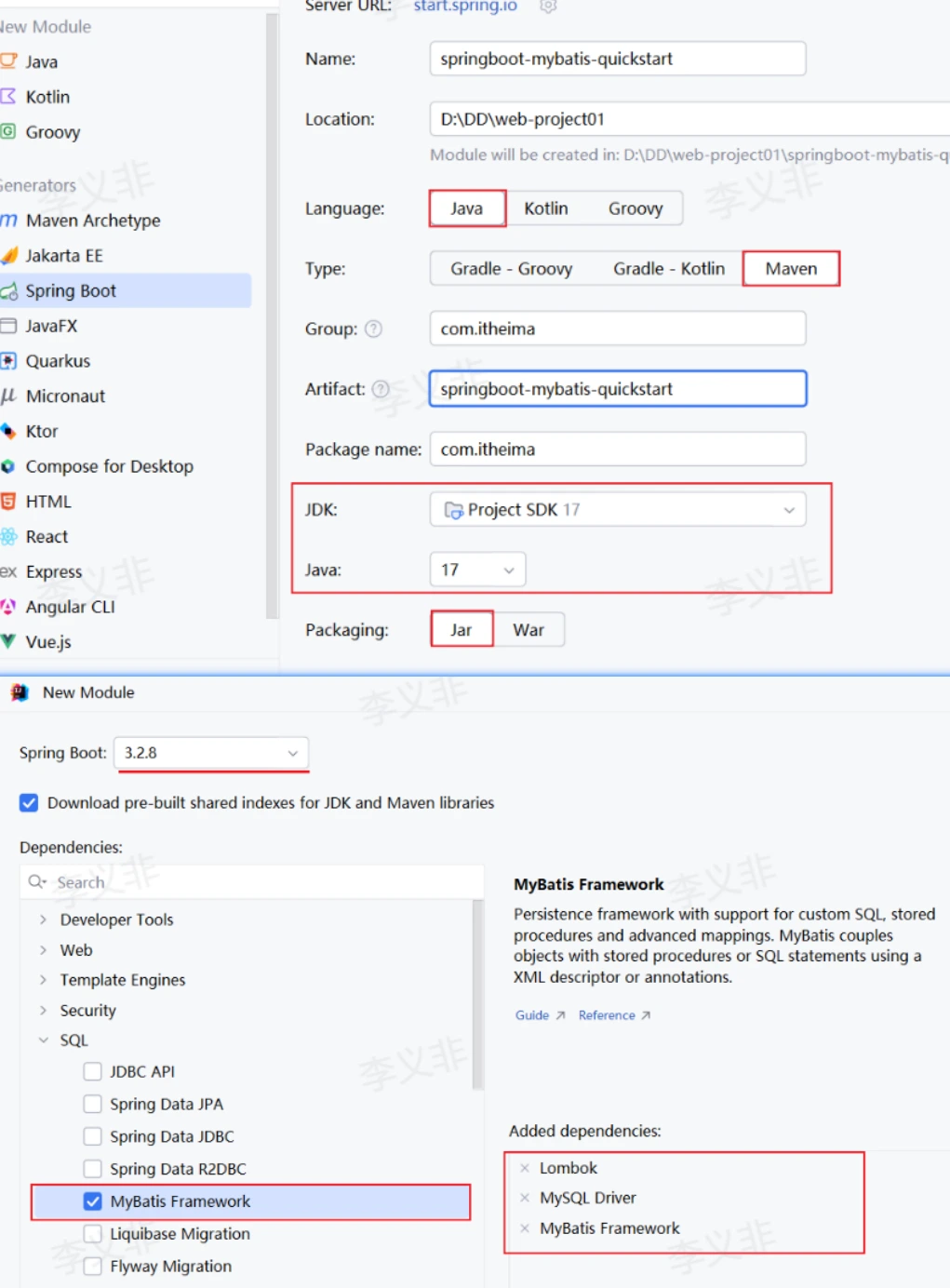
导入依赖
<dependency> <groupId>org.mybatis.spring.boot</groupId> <artifactId>mybatis-spring-boot-starter</artifactId></dependency><dependency> <groupId>mysql</groupId> <artifactId>mysql-connector-java</artifactId></dependency><dependency> <groupId>org.projectlombok</groupId> <artifactId>lombok</artifactId></dependency>mysql数据
create table user( id int unsigned primary key auto_increment comment 'ID,主键', username varchar(20) comment '用户名', password varchar(32) comment '密码', name varchar(10) comment '姓名', age tinyint unsigned comment '年龄') comment '用户表';
insert into user(id, username, password, name, age) values (1, 'daqiao', '123456', '大乔', 22), (2, 'xiaoqiao', '123456', '小乔', 18), (3, 'diaochan', '123456', '貂蝉', 24), (4, 'lvbu', '123456', '吕布', 28), (5, 'zhaoyun', '12345678', '赵云', 27);实体类封装类型
@Data@NoArgsConstructor@AllArgsConstructorpublic class User { private Integer id; private String username; private String password; private String name; private Integer age;}配置Mybatis
application.properties:
spring: application: name: tlias-web-management datasource: url: jdbc:mysql://localhost:3306/tlias driver-class-name: com.mysql.cj.jdbc.Driver username: root password: 123456编写Mapper接口
@Mapperpublic interface UserMapper { @Select("select * from user") public List<User> findAll();}//统一扫描比每个接口加 `@Mapper` 更简洁@SpringBootApplication@MapperScan("com.example.car.mapper")public class Application { public static void main(String[] args) { SpringApplication.run(Application.class, args); }}@Mapper:表示Mybatis中的Mapper接口,运行时框架自动生成代理对象并交由Spring IOC容器管理。
@Select:编写select查询语句。
单元测试
@SpringBootTestclass ApplicationTests { @Autowired private UserMapper userMapper;
@Test public void testFindAll() { List<User> userList = userMapper.findAll(); userList.forEach(System.out::println); }}JDBC vs Mybatis
| JDBC缺点 | Mybatis解决方案 |
|---|---|
| url/username/password硬编码在代码中 | 配置在 application.properties 中 |
| 查询结果解析封装繁琐 | 自动完成映射封装 |
| 频繁获取/释放连接造成资源浪费 | 内置数据库连接池技术 |
增删改查操作
注解速查
| 操作 | 注解 | 示例 |
|---|---|---|
| 查询 | @Select | @Select("select * from user where id = #{id}") |
| 新增 | @Insert | @Insert("insert into user(...) values(#{...})") |
| 修改 | @Update | @Update("update user set ... where id = #{id}") |
| 删除 | @Delete | @Delete("delete from user where id = #{id}") |
参数占位符
Mybatis提供两种占位符:
| 占位符 | 特点 | 推荐 |
|---|---|---|
#{...} | 预编译SQL(生成 ?),防SQL注入 | 强烈推荐 |
${...} | 直接字符串拼接,存在SQL注入风险 | 不推荐 |
新增示例
@Insert("insert into user(username,password,name,age) values(#{username},#{password},#{name},#{age})")public void insert(User user);多个参数封装到对象中,通过 #{对象属性名} 引用
删除示例
@Delete("delete from user where id = #{id}")public Integer deleteById(Integer id);Integer 返回值表示DML语句影响的记录数。
修改示例
@Update("update user set username=#{username},password=#{password},name=#{name},age=#{age} where id=#{id}")public void update(User user);查询示例(多参数)
@Select("select * from user where username = #{username} and password = #{password}")public User findByUsernameAndPassword(@Param("username") String username, @Param("password") String password);@Param 注解为方法形参起名;基于官方骨架创建的SpringBoot项目中接口编译时会保留方法形参名,@Param 可省略(直接 #{形参名})。
XML映射配置
使用场景
- 注解:简单的增删改查功能。
- XML:复杂的SQL功能。
注意:一个接口方法对应的SQL语句,要么使用注解,要么使用XML,不可同时配置。
XML配置规范
-
XML映射文件名称与Mapper接口名称一致,放在相同包下(同包同名)。
-
XML映射文件的
namespace为Mapper接口全限定名。 -
SQL语句的
id与Mapper接口方法名一致,返回类型一致。
SQL 标签的 id | Mapper 方法名 |
|---|---|
| XML | Java |
namespace | Mapper 接口全限定名 |
#{...} | 方法参数或参数对象属性 |
resultType / resultMap | 每一行结果映射成的类型或规 |
新增
<insert id="insert" useGeneratedKeys="true" keyProperty="id" keyColumn="id"> //前提是数据库表里的 id 字段是自增主键id bigint primary key auto_increment //数据库插入成功后,如果生成了主键 id,MyBatis 会把这个 id 设置回 car 对象的 id 属性。 insert into t_car ( car_num, brand, guide_price, produce_date, car_type ) values ( #{carNum}, #{brand}, #{guidePrice}, #{produceDate}, #{carType} )</insert>更改
<update id="update"> update t_car set car_num = #{carNum}, brand = #{brand}, guide_price = #{guidePrice}, produce_date = #{produceDate}, car_type = #{carType} where id = #{id}</update>必须检查受影响行数。如果期望恰好更新一条,而结果为 0,可能是数据不存在,也可能是乐观锁冲突。
查找
Car selectById(@Param("id") Long id);<select id="selectById" resultType="Car"> select id, car_num, brand, guide_price, produce_date, car_type from t_car where id = #{id}</select>单对象查询的典型结果:
- 0 行:返回
null; - 1 行:返回对象;
- 多于 1 行:抛出
TooManyResultsException。
业务层是否转换成 Optional 取决于项目规范
public Optional<Car> findById(Long id) { return Optional.ofNullable(carMapper.selectById(id));}//Optional 不能自动“显示空的数据”,但它能明确告诉你:查询结果有没有值。你可以在 Optional.empty() 的时候输出 id,这样就能看到“哪个 id 的数据不存在”。List<Long> ids = List.of(1L, 2L, 3L, 100L);for (Long id : ids) { carService.findById(id) .ifPresentOrElse( car -> System.out.println("查到了:" + car), () -> System.out.println("没有找到,id = " + id) );}删除
<delete id="deleteById"> delete from t_car where id = #{id}</delete>真实系统应根据审计和恢复要求选择物理删除或逻辑删除。逻辑删除不是简单增加一个字段就结束,还要确保所有查询、唯一约束和索引都正确处理删除状态。
resultType
<select id="selectById" resultType="com.example.car.domain.Car"> select id, car_num as carNum, brand, guide_price as guidePrice, produce_date as produceDate, car_type as carType, version from t_car where id = #{id}</select>为了让数据库列名和 Java 属性名对上
开启驼峰命名法数据库属性列名 javabean实体类属性id -> idbrand -> brandversion -> versioncar_num -> carNumguide_price -> guidePriceproduce_date -> produceDatecar_type -> carTyperesultMap
嵌套
public class Car { private Long id; private String carNum; private Brand brand;}public class Brand { private Long id; private String name;}//id 是这个映射规则的名字后面查询语句可以通过它引用resultMap="CarResultMap"//type 是要封装成哪个 Java 类型<resultMap id="CarResultMap" type="com.example.car.domain.Car">//<id> 专门用来标识主键字段,property 写 Java 属性名//column 写 SQL 查询结果里的列名//column 写的是“查询结果列名”,不一定是表字段原名或者as别名//两个id字段名冲突时必须用别名 <id property="id" column="id"/> <result property="carNum" column="car_num"/>
//Car 对象里有一个属性:private Brand brand; <association property="brand" javaType="com.example.car.domain.Brand"> <id property="id" column="brand_id"/> <result property="name" column="brand_name"/> </association></resultMap><select id="selectById" resultMap="CarResultMap"> select c.id, c.car_num, c.guide_price, c.produce_date, c.car_type, b.id as brand_id, b.name as brand_name from t_car c left join t_brand b on c.brand_id = b.id where c.id = #{id}</select>
//c.car_num -> car.carNum//b.id -> car.brand.id//b.name -> car.brand.name一对多
public class Car { private Long id; private String carNum; private List<CarImage> images;}public class CarImage { private Long id; private String url;}<resultMap id="CarWithImagesResultMap" type="com.example.car.domain.Car"> <id property="id" column="id"/> <result property="carNum" column="car_num"/>
<collection property="images" ofType="com.example.car.domain.CarImage"> <id property="id" column="image_id"/> <result property="url" column="image_url"/> </collection></resultMap><select id="selectByIdWithImages" resultMap="CarWithImagesResultMap"> select c.id, c.car_num, i.id as image_id, i.url as image_url from t_car c left join t_car_image i on c.id = i.car_id where c.id = #{id}</select>
//Car { id = 1, carNum = "C1001", images = [ CarImage { id = 10, url = "a.jpg" }, CarImage { id = 11, url = "b.jpg" }, CarImage { id = 12, url = "c.jpg" } ]}动态SQL
where与 if
- 有条件时自动加
- 如果条件开头多了and或or自动去掉
- 它不会保证一定有条件
- 删除和更新无条件可能就是事故
<select id="search" resultMap="carResultMap"> select id, car_num, brand, guide_price, produce_date, car_type, version from t_car <where> <if test="brand != null and brand != ''"> brand like concat('%', #{brand}, '%') </if> <if test="minPrice != null"> and guide_price >= #{minPrice} </if> <if test="maxPrice != null"> and guide_price <= #{maxPrice} </if> <if test="carType != null and carType != ''"> and car_type = #{carType} </if> <if test="producedAfter != null"> and produce_date >= #{producedAfter} </if> </where> order by id desc</select>>= >=<= <=<delete id="deleteByCondition"> delete from t_car <where> <if test="brand != null">brand = #{brand}</if> </where></delete>//若未传入brand就会直接删表//Service 层必须做条件校验<delete id="deleteByBrand"> delete from t_car where brand = #{brand}</delete>public int deleteByBrand(String brand) { if (brand == null || brand.isBlank()) { throw new IllegalArgumentException("brand 不能为空,禁止无条件删除"); } return carMapper.deleteByBrand(brand);}set
<update id="updateSelective"> update t_car <set> <if test="brand != null">brand = #{brand},</if> <if test="guidePrice != null"> guide_price = #{guidePrice}, </if> <if test="carType != null">car_type = #{carType},</if> </set> where id = #{id}</update>choose.otherwise
<select id="searchByBestCondition" resultMap="carResultMap"> select id, car_num, brand, guide_price, produce_date, car_type, version from t_car <where> <choose> <when test="id != null"> id = #{id} </when> <when test="carNum != null and carNum != ''"> car_num = #{carNum} </when> <when test="brand != null and brand != ''"> brand like concat('%', #{brand}, '%') </when> <otherwise> 1 = 0 </otherwise> </choose> </where> order by id desc</select>//1 = 0表示没有任何有效条件时,不返回任何数据foreach
int batchInsert(@Param("cars") List<Car> cars);
<insert id="batchInsert"> insert into t_car ( car_num, brand, guide_price, produce_date, car_type ) values //collection="cars" 对应 Mapper 参数名 //item="car" 表示循环里的每一个元素叫 car <foreach collection="cars" item="car" separator=","> ( #{car.carNum}, #{car.brand}, #{car.guidePrice}, #{car.produceDate}, #{car.carType} ) </foreach></insert>//与in关键字结合<select id="selectByIds" resultMap="carResultMap"> select id, car_num, brand, guide_price, produce_date, car_type, version from t_car where id in <foreach collection="ids" item="id" open="(" separator="," close=")"> #{id} </foreach></select>
//Service层public List<Car> findByIds(List<Long> ids) { if (ids == null || ids.isEmpty()) { return List.of(); } return carMapper.selectByIds(ids);}注意事项
-
测试类所在包需要与引导类所在包相同。
-
强烈建议使用
#{}占位符,防止SQL注入。 -
DML操作建议定义
Integer返回值接收影响行数。 -
MybatisX是IDEA中快速开发Mybatis的插件,可快速定位Mapper与XML的映射关系
-
resultType写元素类型,即使方法返回List<Car>,也仍然写Car,不写List
原生Mybatis
try (InputStream input = Resources.getResourceAsStream("mybatis-config.xml")) { SqlSessionFactory factory = new SqlSessionFactoryBuilder().build(input);
try (SqlSession session = factory.openSession()) { CarMapper mapper = session.getMapper(CarMapper.class); Car car = mapper.selectById(1L); session.commit(); }}生命周期:
SqlSessionFactoryBuilder:构建后即可丢弃;SqlSessionFactory:应用级共享;SqlSession:一次工作单元使用,线程不安全;- Mapper 代理:原生模式依附于 Session。
Spring 注入的 Mapper 可以作为单例 Bean 使用,因为 MyBatis-Spring 会为调用查找当前事务对应的 Session。业务代码只需注入 Mapper,并在 Service 定义事务边界
Mybatis日志输出
在Mybatis中,SQL语句执行时,我们并看不到SQL语句的执行日志。 在application.properties加入如下配置,即可查看日志: ‘
#mybatis的配置mybatis.configuration.log-impl=org.apache.ibatis.logging.stdout.StdOutImpl单元测试
数据库连接池
数据库连接池是一个容器,负责分配、管理数据库连接。
工作原理:
- 程序启动时,在连接池中创建一定数量的Connection对象。
- 客户端执行SQL时从连接池获取Connection,执行完毕后归还(复用)。
- 空闲时间超过最大空闲时间的连接会被自动释放。
好处:资源重用、提升响应速度、避免连接遗漏。
常见连接池产品
| 连接池 | 说明 |
|---|---|
| Hikari | SpringBoot默认,性能优越 |
| Druid | 阿里巴巴开源,功能强大 |
| C3P0 / DBCP | 老牌连接池,较少使用 |
<dependency> <groupId>com.alibaba</groupId> <artifactId>druid-spring-boot-starter</artifactId> <version>1.2.19</version></dependency>spring.datasource.type=com.alibaba.druid.pool.DruidDataSourcespring.datasource.druid.driver-class-name=com.mysql.cj.jdbc.Driverspring.datasource.druid.url=jdbc:mysql://localhost:3306/webspring.datasource.druid.username=rootspring.datasource.druid.password=1234支持与分享
如果这篇文章对你有帮助,欢迎分享给更多人或打赏支持!